 |
|
The Clock-In Browser allows you to see clock-in activity for several days at a time. You can click on a date to view one day’s activity or click and drag to select multiple days of activity.
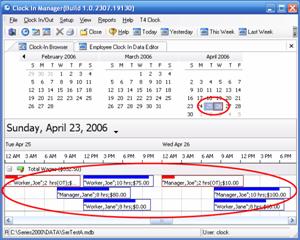
In the figure above, the dates selected are circled in red along with the activity for those days. Shifts with overtime are in red, and regular shifts are in blue. This is so you can notice and easily differentiate when employees are working overtime.

You can also use the toolbar shown above to choose which days activity you would like to view (today, yesterday, this week, last week).
 Contents
 Index
Index Search
 Previous
 Next
Next