FORM1 ERROR
If the S2K-Client, looks like this…
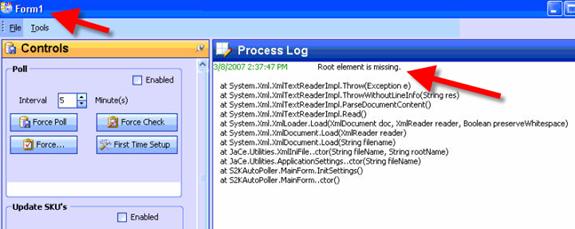
… Then do
this….
1. Press Ctrl+Alt+Del to close the S2K Client window.
2. Go to the following directory:
- C:\Documents and Settings\MacKenzie\Local Settings\Apps
- Delete the 2.0 folder
3. Go to the following directory:
- C:\WINDOWS\system32
- Rename the settings.xml file to settings[today’s date].xml
4. Reinstall the S2K.NET Client from the following website:
- www.series2k.com/downloads.html
-
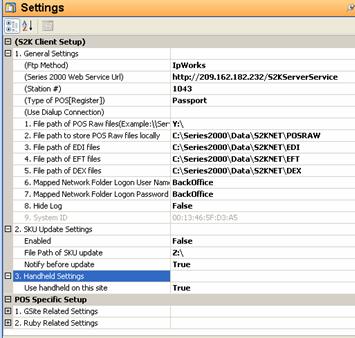 |
Use these settings on the S2K.NET Client
loans loans loans loans loans loans loans loans loans loans loans loans loans loans loans loans loans loans loans loans loans loans loans loans loans loans loans loans loans loans loans loans loansloans loans loans loans loans loans loans insurance insurance mortgage mortgage