Version 2.1.7 – release date: 4/23/15
1- Fixed time zone to use local when scheduling auto email reports.
Your scheduled emails that are auto-generated are set to run in your specific locale. For example, a report scheduled to run at 7:00am will run at that time whether you are in the Pacific or Eastern time-zone.
2- Fixed timestamp on printed reports to use Pacific Time.
Regardless of your specific locale, reports will be printed with a Pacific time-zone stamp.
3- Auto accept promotion feature added.
The Auto accept promotion feature will be included in future S2K training modules.
4- Non-retail changes completed to core items are placed into the pending price changes window.
In addition to Retail price changes, any core item attribute changed (excluding Retail Price) by the Pricebook Team will appear in pending price changes. To ensure the POS is synchronized with S2K, the site will need to publish all items in their pending price change window daily.
5- Added ability to hide/show expired (archived) promotions in promotion listing:
Once a promotion has expired and been removed from the POS, it will automatically be archived. To view the archived promotions, select the Archived button located at the top of the Promotion Listing window.

In the pop-up window, input the appropriate date range for your search of archived promotions and click the OK button.
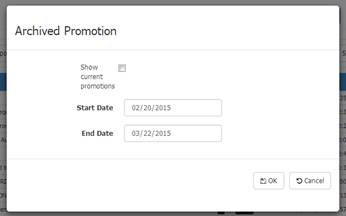
The archived promotions within the date range will appear in your listing.