|
|
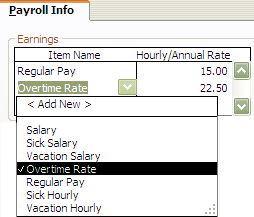
To add an overtime rate for the employee, you can do so after you have entered in the regular pay rate. Once you enter in the regular pay rate, just hit the tab key and click on the arrow to show the drop down menu as seen below.
When you select ‘Overtime Rate’ it will automatically calculate it as time and a half. As you can see above, 22.50 is automatically put in as the overtime rate for the 15.00 regular pay rate.
 Contents
 Index
Index Search
 Previous
 Next
Next